VM_Emoji
A Unity Editor window for browsing, searching, and copying Unicode 16.0 emojis and Dingbats symbols — ideal for custom inspectors, debug logs, and editor tools.
About
Changelog
May 2026 — Initial Release
Features
- Unicode 16.0 emoji standard support with 1,797 displayed symbols
- Total database contains 3,923 symbols (including composite variations)
- 1,396 "square" single-glyph emojis displayed for optimal visual consistency
- 142 unique Dingbats symbols (duplicates with emojis filtered out)
- 260+ country flags included (🇺🇸 🇬🇧 🇯🇵 🇷🇺 🇨🇳 and more!)
- Composite emojis filtered out (skin tone variations, ZWJ sequences)
- Subdivision flags filtered out (England, Scotland, Wales)
- Component category excluded (skin tone modifiers, hair styles, etc.)
- No duplicate symbols - each appears only once in its primary category
- Smart filtering ensures clean, consistent visual display in Unity Editor
- 10 organized categories with visual icons (including ✦ Dingbats)
- Fast search functionality with keyword filtering
- One-click copy to clipboard
- Category-based filtering with toggle buttons
- Keyboard shortcut support (Ctrl+F / Cmd+F)
- Persistent window size and position
- Recompilation-safe state preservation
- Dark theme support
- Comprehensive documentation
- Tooltip hints for user guidance
Technical
- Editor-only implementation (zero runtime overhead)
- EditorWindow-based architecture
- Efficient emoji data caching
- Lazy-initialized GUI styles for performance
- Proper resource cleanup on window destroy
Known Limitations
- For runtime UI, use fonts with emoji support (e.g., NotoColorEmoji, Segoe UI Emoji)
Overview
Emoji Overview Window is a Unity Editor tool that provides easy access to the Unicode 16.0 emoji standard + Dingbats symbols directly in your Unity Editor.
Perfect for Unity developers who want to enhance their custom inspectors, editor windows, debug messages, and UI labels with visual emoji symbols.
Who Is This For?
- ✓ Unity Editor developers creating custom inspectors
- ✓ Tool developers building editor windows and utilities
- ✓ Developers wanting to add visual flair to debug messages
- ✓ Anyone who needs quick access to emojis while working in Unity
Common Use Cases
- - Adding emoji icons to custom inspector labels and headers
- - Enhancing editor window titles and categories
- - Making debug logs more readable with visual indicators
- - Creating visually appealing tool descriptions
- - Adding personality to editor UI elements
What's Included
Browse, search, and copy 1,797 symbols organized into 10 categories:
- • 😁 Smiles - Facial expressions and emotions
- • 🙋 People - People, gestures, professions, activities
- • 🐶 Animals - Animals, nature, plants
- • 🍉 Food - Food, drinks, fruits
- • ✈️ Travel - Transportation, buildings, places
- • 🎲 Activities - Sports, games, events
- • 💡 Objects - Everyday objects, tools, items
- • ☢️ Symbols - Signs, symbols, icons
- • 🚩 Flags - Country and regional flags (260+ countries)
- • ✦ Dingbats - 142 unique decorative symbols (✓✕✗★☆❶➀➊➡➕➖ and more!)
Why Are Some Emojis Filtered Out?
The window displays 1,797 symbols out of 3,923 total in the Unicode 16.0 database. Composite and component glyphs are filtered out so every cell shows a clean, single-glyph "square" symbol that scales identically with font size.
Filtered emoji types:
- ❌ Skin Tone Variations — same emoji in 5 different skin tones Example: 👋 👋🏻 👋🏼 👋🏽 👋🏾 👋🏿 → Only 👋 displayed
- ❌ ZWJ Sequences — multi-glyph combinations (Zero Width Joiner) Example: 👨👩👧 (family) → Made from 👨 + 👩 + 👧 Example: 🏳️🌈 (rainbow flag) → Made from 🏳️ + 🌈
- ❌ Component Symbols — hair styles, skin tone modifiers Example: 🏻 🏼 🏽 🏾 🏿 (modifier symbols)
- ❌ Subdivision Flags — regional flags with tag characters Example: 🏴 (England), 🏴 (Scotland), 🏴 (Wales)
Features
- ✓ Fast search with keyword filtering
- ✓ Category-based filtering with visual toggles
- ✓ One-click copy to clipboard
- ✓ Keyboard shortcut support (Ctrl+F / Cmd+F)
- ✓ Persistent window size, position, search, and category
- ✓ Dark theme support
- ✓ Recompilation-safe — state survives domain reload
Requirements
- - Unity 2021.3 or higher
- - Editor Only (does not affect runtime / builds)
- - Unicode-compatible fonts required for emoji display in your target apps
Important Notes
- - Emojis are Unicode characters and require font support
- - Default Unity UI fonts may not display all emojis correctly
- - For runtime UI, use fonts with Unicode emoji support (e.g. NotoColorEmoji, Segoe UI Emoji)
- - This tool is for Editor workflow convenience — runtime display depends on system/font support
Appearance
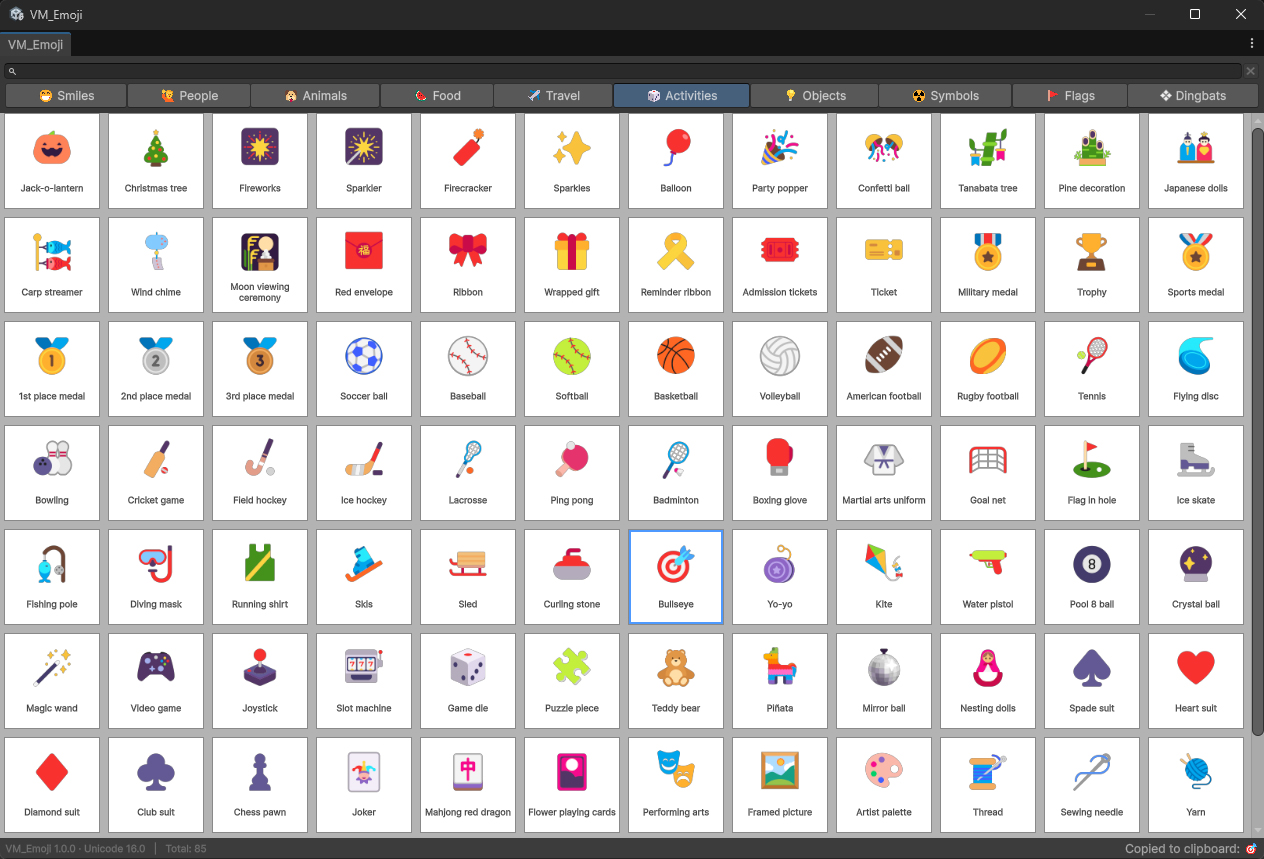
Tip
💡 Pair VM_Emoji with VM_Attributes for a richer Unity Inspector workflow — use emojis directly in attribute labels and headers.
Quick Start
Installation
- 1. Import the package into your Unity project
- 2. The tool will be automatically available in Unity Editor
Usage
- 1. Select the Unity menu — Tools / VM-Gamedev / VM_Emoji / Overview emoji
- 2. Browse — use category toggles or scroll through the grid
- 3. Search — type a keyword (e.g. "smile", "heart", "flag"); Ctrl+F (Cmd+F on Mac) focuses the search field
- 4. Copy — click any symbol to copy it to clipboard; paste with Ctrl+V (Cmd+V)
- 5. Window size, position, search query and selected category are preserved across recompilation
Use Cases & Examples
1. Custom Inspector Labels
EditorGUILayout.LabelField("⚙️ Settings", EditorStyles.boldLabel);
EditorGUILayout.LabelField("📁 File Path");
EditorGUILayout.LabelField("🎨 Color Options");
2. Editor Window Titles
window.titleContent = new GUIContent("🔧 Build Tools");
window.titleContent = new GUIContent("📊 Statistics");
3. Debug Messages
Debug.Log("✓ Success: Data loaded");
Debug.LogWarning("⚠ Warning: Low memory");
Debug.LogError("❌ Error: File not found");
4. Status Indicators
string status = isComplete ? "✓ Done" : "⏳ Processing";
EditorGUILayout.LabelField(status);
5. UI Buttons
if (GUILayout.Button("✕ Close")) { window.Close(); }
if (GUILayout.Button("➕ Add")) { AddItem(); }
if (GUILayout.Button("🗑️ Delete")) { DeleteItem(); }
6. Category Headers
EditorGUILayout.LabelField("★ Important Settings");
EditorGUILayout.LabelField("➡ Next Steps");
EditorGUILayout.LabelField("🔍 Search Options");
7. Toolbar Icons
GUIContent[] toolbarIcons = {
    new GUIContent("📝 Edit"),
    new GUIContent("👁️ View"),
    new GUIContent("⚙️ Settings")
};
Example 1: Close Button
GUIStyle closeButton = new GUIStyle(GUI.skin.button);
closeButton.fontSize = 16;

Rect closeRect = new Rect(position.width - 25, 5, 20, 20);
if (GUI.Button(closeRect, "✕", closeButton))
{
    Close();
}
Example 2: Status Display
void DrawStatus(bool isSuccess)
{
    GUIStyle statusStyle = new GUIStyle(EditorStyles.label);
    statusStyle.fontSize = 14;

    string icon = isSuccess ? "✓" : "❌";
    string text = isSuccess ? "Completed" : "Failed";

    EditorGUILayout.LabelField($"{icon} {text}", statusStyle);
}
Example 3: Category Sections
void DrawSection(string title)
{
    GUIStyle headerStyle = new GUIStyle(EditorStyles.boldLabel);
    headerStyle.fontSize = 16;

    EditorGUILayout.Space(10);
    EditorGUILayout.LabelField($"★ {title}", headerStyle);
    EditorGUILayout.BeginVertical(EditorStyles.helpBox);
    // Your content here...
    EditorGUILayout.EndVertical();
}
Example 4: Enhanced Debug Logs
public static class DebugPlus
{
    public static void Success(string message)
    {
        Debug.Log($"✓ {message}");
    }

    public static void Info(string message)
    {
        Debug.Log($"ℹ️ {message}");
    }

    public static void Warning(string message)
    {
        Debug.LogWarning($"⚠ {message}");
    }

    public static void Error(string message)
    {
        Debug.LogError($"❌ {message}");
    }
}

// Usage:
DebugPlus.Success("Asset loaded successfully");
DebugPlus.Warning("Cache is running low");
DebugPlus.Error("Failed to connect to server");
Troubleshooting
Q: Symbols appear as boxes (□) in Unity Editor?
A: Your system font may not support that symbol. Try:
- • Update to latest Unity version
- • Use different symbols from Dingbats category
- • Check if symbol displays in other apps
Q: Emojis are black & white instead of colorful?
A: This is normal in Unity Editor! Emojis may appear colorful:
- • On mobile devices (iOS/Android) at runtime
- • With special emoji fonts in TextMeshPro
- • Dingbats are intentionally monochrome
Q: Symbol doesn't scale properly?
A: Ensure you're setting fontSize, not just font:
style.fontSize = 20; // Correct ✓
style.font = myFont; // Not enough for sizing
Q: Can't copy symbol from overview window?
A: Click the symbol to copy to clipboard, then paste with Ctrl+V (Cmd+V)
Q: Can't find a symbol with search?
A: Search works across all categories automatically.
- • Just type your query — results from every category are shown
- • Click any category tab to exit search mode and browse that category
- • Example: searching "heart" finds ❤ from Symbols, 💕 from Smiles, etc.